目次
登録、書き出し等をつけたもの
- 1日がかかり。時間かかりすぎ。もっとよいやりかたがあるはず
- まずはイメージ図。手戻りが多い
- 辞書の読み込み、使い方、値の引っ張り方、前と今のデータの持ち方、など課題多い
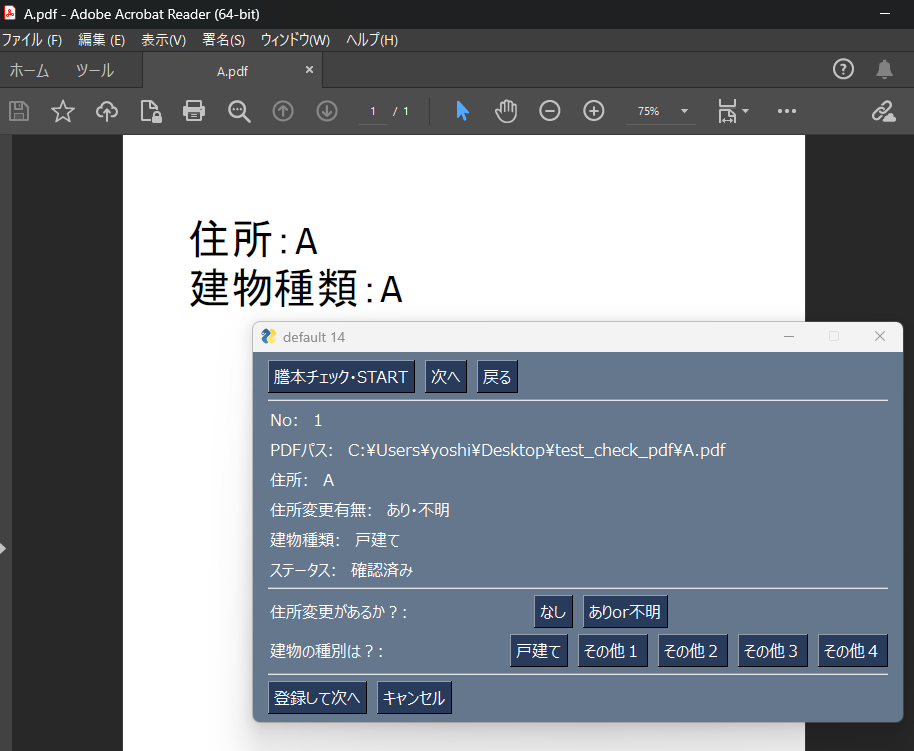
import PySimpleGUI as sg
import pandas as pd
import pathlib
import subprocess
import time
import pyautogui as pag
import pygetwindow as gw
import sys

p = pathlib.Path(r"C:\Users\○○\Desktop\test_check_pdf\check_addr_builtype.csv")
df = pd.read_csv(p, encoding='cp932', index_col='No')

# データを最初に辞書化
dic_all = df.to_dict(orient='index')

# チェックしたい実際の番号(例:1,5,7...)(都度変わる)
num_to_view = [1,2,3]

# current_indexはget_index()内で書き換える
global current_index
current_index = 0
end_index = len(num_to_view) - 1

# 謄本PDFの実際のNo
No = num_to_view[current_index]


def start_msg():
    is_start_ok = sg.popup_ok_cancel("指定されたNoを最初から読み込みます。よろしいですか?", keep_on_top=True)
    if is_start_ok == 'OK':
        pass
    else:
        sg.popup('処理を中断します')
        sys.exit()


def open_pdf(pdf_path):
    subprocess.run(['explorer', pdf_path])
    time.sleep(1.5)
    pag.hotkey('shift', 'F4')
    time.sleep(1)


def close_pdf(pdf_path):
    pdf_name = pathlib.Path(pdf_path).name
    try:
        pdf = gw.getWindowsWithTitle(f'{pdf_name}')[0]
        pdf.close()
    except Exception as ex:
        pass

# Not No
def countup_index(current_index):
    if current_index < end_index:
        current_index += 1
        return current_index
    elif current_index == end_index:
        return current_index


def countdown_index(current_index):
    if current_index > 0:
        current_index -= 1
        return current_index
    elif current_index == 0:
        return current_index


def clear_input():
    window['-IsChangeAdd-'].update('')
    window['-IsTypeOfBuild-'].update('')


# 対象のボタンを押下の前後 current_index を取得
def get_index(current_index):
    global before_index
    before_index = current_index
    print(f'{before_index=}')
    if event == '-Start-':
        current_index = 0
    elif event in ('-Next-', '-Register-'):
        if current_index < end_index:
            current_index = current_index + 1
        else:
            current_index = current_index
    elif event == '-Previous-':
        if current_index > 0:
            current_index = current_index - 1
        else:
            current_index = current_index
    else:
        "処理中断"
        sys.exit()
    return before_index, current_index


layout = [
    [sg.Button('謄本チェック・START', key='-Start-'), sg.Button('次へ', key='-Next-'), sg.Button('戻る', key='-Previous-')],
    [sg.HSep()],
    [sg.Text('No:'), sg.Text(size=(15,1), key='-DicNo-')],
    [sg.Text('PDFパス:'), sg.Text(size=(50,1), key='-DicPdfPath-')],
    [sg.Text('住所:'), sg.Text(size=(50,1), key='-DicAdd-')],
    [sg.Text('住所変更有無:'), sg.Text(size=(15,1), key='-DicChangeAdd-')],
    [sg.Text('建物種類:'), sg.Text(size=(15,1), key='-DicTypeBuild-')],
    [sg.Text('ステータス:'), sg.Text(size=(15,1), key='-DicStatus-')],
    [sg.HSep()],
    [sg.Text('住所変更があるか?:'), sg.Text(size=(10, 1), key='-IsChangeAdd-'), sg.Button('なし', key='-NoChange-'), sg.Button('ありor不明', key='-WithChangeUnknown-')],
    [sg.Text('建物の種別は?:'), sg.Text(size=(10, 1), key='-IsTypeOfBuild-'), sg.Button('戸建て', key='-A-'), sg.Button('その他1'), sg.Button('その他2'), sg.Button('その他3'), sg.Button('その他4')],

    [sg.HSep()],
    [sg.Button('登録して次へ', key='-Register-'), sg.Button('キャンセル')]
]

window = sg.Window('default 14', layout, keep_on_top=True)

while True:
    event, values = window.read()
    print(event, values)
    if event in (sg.WIN_CLOSED, 'キャンセル'):
        break

    # 登録後、毎回DFへ出力(再読み込みなし)。下のeventより上でないと登録箇所が空白になるので注意
    if event == '-Register-':
        change_add = window['-IsChangeAdd-'].get()
        build_type = window['-IsTypeOfBuild-'].get()
        dic_all[current_No]['住所変更有無'] = change_add
        dic_all[current_No]['建物種類'] = build_type
        af_name = p.parent / (p.stem + "_test" + p.suffix)
        print(af_name)
        pd.DataFrame(dic_all).T.to_csv(af_name, encoding='cp932')

    # 画面更新とPDFの開閉
    if event in ('-Start-', '-Next-', '-Previous-', '-Register-'):
        index, current_index = get_index(current_index)
        before_No = num_to_view[before_index]
        current_No = num_to_view[current_index]

        # 前の選択後の表示内容は消去
        window['-IsChangeAdd-'].update('')
        window['-IsTypeOfBuild-'].update('')

        # current_No に応じて画面を更新する
        pdf_path, add, change_add, type_build, status = dic_all[current_No].values()
        window['-DicNo-'].update(current_No)
        window['-DicPdfPath-'].update(pdf_path)
        window['-DicAdd-'].update(add)
        window['-DicChangeAdd-'].update(change_add)
        window['-DicTypeBuild-'].update(type_build)
        window['-DicStatus-'].update(status)

        # before_No, current_No より前後のPDFを開閉
        before_pdf_path, _, _, _, _ = dic_all[before_No].values()
        close_pdf(before_pdf_path)
        open_pdf(pdf_path)

    if event == '-NoChange-':
        window['-IsChangeAdd-'].update('なし')
    if event == '-WithChangeUnknown-':
        window['-IsChangeAdd-'].update('あり・不明')
    if event == '-A-':
        window['-IsTypeOfBuild-'].update('戸建て')
    if event == 'その他1':
        window['-IsTypeOfBuild-'].update('その他1')
    if event == 'その他2':
        window['-IsTypeOfBuild-'].update('その他2')
    if event == 'その他3':
        window['-IsTypeOfBuild-'].update('その他3')
    if event == 'その他4':
        window['-IsTypeOfBuild-'].update('その他4')

window.close()
シンプル版(これはこれで良い)
import pathlib
import pandas as pd
import PySimpleGUI as sg
import subprocess
import pyautogui as pag
import time
import pygetwindow as gw

# Noとそれに紐づくPDFのPATHのテーブルを作成しておく
p = pathlib.Path(r"C:~~~\check_addr_builtype.xlsx")

df = pd.read_excel(p)
# 辞書作成 以前はこうやっていたが。df = df.set_index('No').T -> pdf_dict = df.to_dict()
pdf_dict = df.to_dict(orient='index')

def open_pdf(No):
    pdf_path = df[No]['PDF_PATH']
    subprocess.run(["explorer", pdf_path])
    time.sleep(1.5)
    pag.hotkey('shift', 'f4') # pdfの右側の表示を消す

def close_pdf(No):
    pdf_name = pathlib.Path(df[No]['PDF_PATH']).name # PDFの名前を確認し
    pdf = gw.getWindowsWithTitle(f'{pdf_name}')[0] # 開いているファイル一覧からそのPDFの名前を取得し
    pdf.close()

def open_close_pdf():
    for key in sorted(pdf_dict):
        open_pdf(key)
        is_next = sg.popup_ok_cancel("次に進みますか?")
        if is_next:
            close_pdf(key)
        else:
            sys.exit()
    sg.popup("すべて終了しました")