目次
SDK_help
sg.main_sdk_help()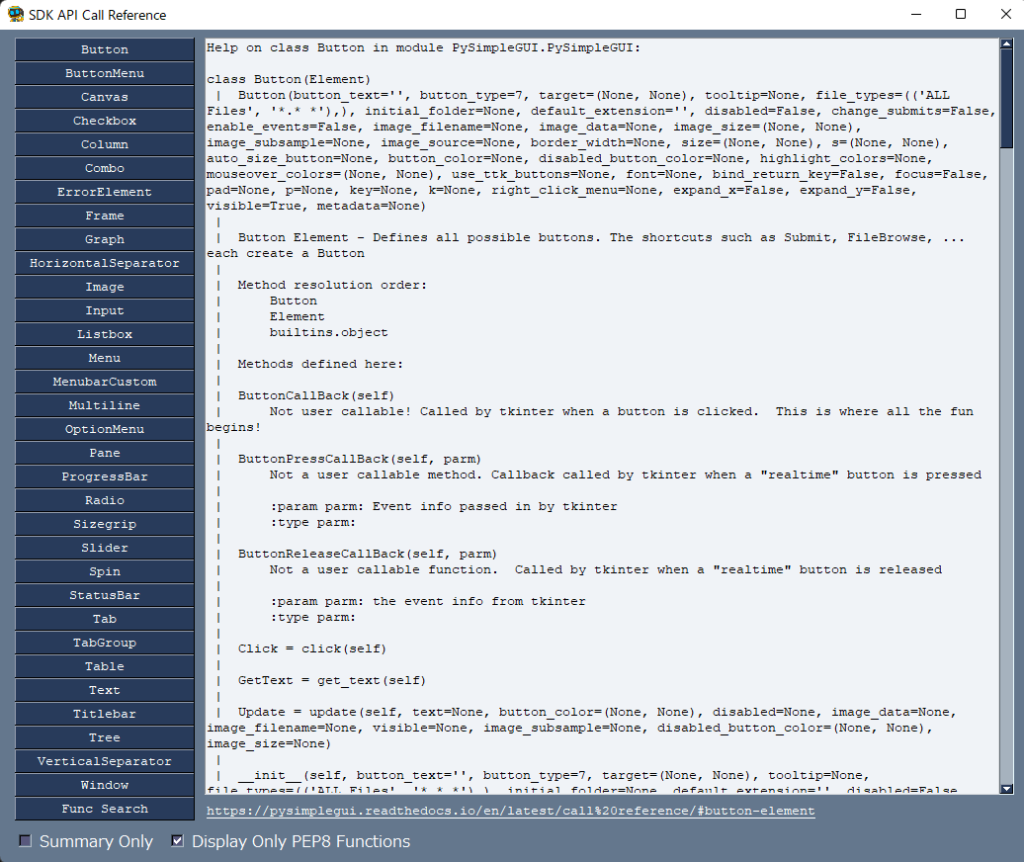
テーマ
# テーマの設定
import PySimpleGUI as sg

sg.theme('dark grey 9')
テーマの種類を見たい
- sg.theme(‘Theme Name’) のTheme Name は以下で参照する
sg.theme_previewer()
全体の設定
set_options
スクリプト上で一時的?に設定をしたい場合
- ここで設定すると、すべてのテキストとボタンが16ポイントに変更される
import PySimpleGUI as sg

sg.set_options(font='Default 16', keep_on_top=True)
各パラメーターのデフォルト設定を変更したい場合は、pyファイル自体を変更する
- 「pip show PySimpleGUI」 でパッケージの場所(Location)を検索する
- その場所を開き、「PySimpleGUI」> PySimpleGUI.pyを探す
- PySimpleGUI.pyファイル内の「set_options」箇所を検索する(下図)
- 変更したい箇所のパラメーターを変更する(上記リンク先を参照)
- たとえば、フォントの種類、サイズを変更したい場合は
myfont = ('Meiryo UI', 12) で

set_optionsのパラメータ:font=Noneを
font=myfont、に変更すれば良い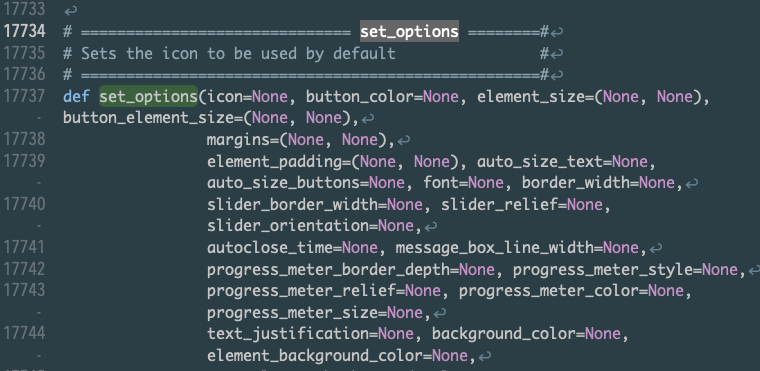
レイアウト作成のイメージ

サンプル1
import PySimpleGUI as sg

# レイアウトは行で並ぶ
layout = [
    [sg.Text('ライン1', font=20), sg.Text('行で並ぶよ')],
    [sg.Input('Input', key='-入力-')],
    [sg.Text('この行に上のinput結果を後々反映させることもできます', key='-出力-')],
    [sg.Checkbox('チェックボックス')],
    [sg.Radio('group_id:1', 1)],
    [sg.Radio('group_id:2', 2)],
    [sg.Radio('group_id:3', 3)],
    [sg.Button(
        button_text='button_text',
        font=20,
        size=(10, 1)
    )],
    [sg.Button('同じ行(リスト)に'), sg.Button('入れると横に並ぶよ')]
]

window = sg.Window('Window Title', layout)

while True:
    event, values = window.read()

    if event == sg.WIN_CLOSED:
        break

window.close()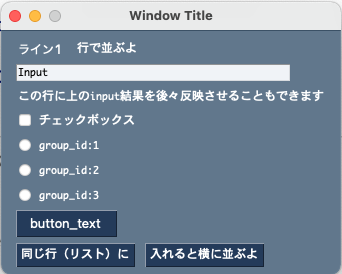
サンプル2
ファイルを選択(単一、複数)、フォルダを選択
- 以下のようなレイアウトの場合、popup_get_fileやfoler を使うとそちらが最初に起動してしまう
- よって、次のような書き方をする
[sg.Text('ファイル_単一:'), sg.Input(key='-file-'), sg.FileBrowse()],
[sg.Text('ファイル_複数:'), sg.Input(key='-files-'), sg.FilesBrowse()],
[sg.Text('フォルダ:'), sg.Input(key='-folder-'), sg.FolderBrowse()],
subprocessを使うには
- sg.execute_command_subprocess(‘explorer’, values[‘-KEY-‘]) (Winの場合)
- 参考HP
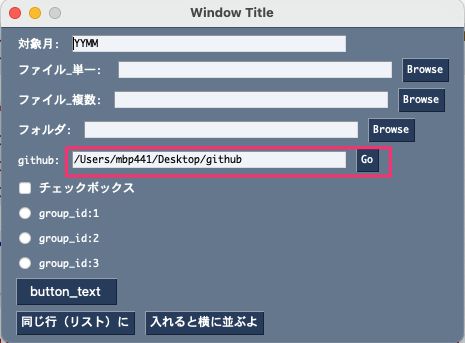
- リンク先へのジャンプ(Go)の処理は次の通り
- WindowsとMacでは書き方が異なる
- Windowsのパスは r “path” となる
import PySimpleGUI as sg
# import subprocess ←不要

# レイアウトは行で並ぶ
layout = [
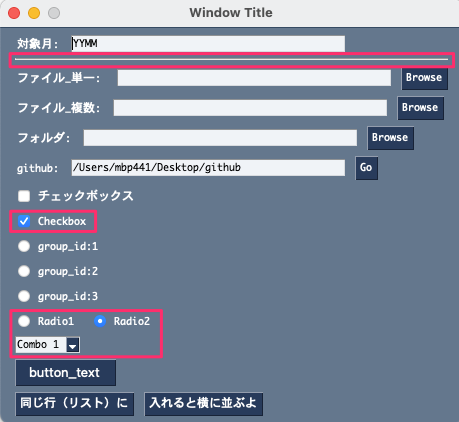
    [sg.Text('対象月:'), sg.Input('YYMM', key='-対象月-')],

    [sg.Text('ファイル_単一:'), sg.Input(key='-file-'), sg.FileBrowse()],
    [sg.Text('ファイル_複数:'), sg.Input(key='-files-'), sg.FilesBrowse()],

    [sg.Text('フォルダ:'), sg.Input(key='-folder-'), sg.FolderBrowse()],

    # Windowsの場合はrが必要
    [sg.Text('github:'), sg.Input(r"/Users/〜〜〜/Desktop/github", key='-open_github-'), sg.Button('Go')],

    [sg.Checkbox('チェックボックス')],
    [sg.Radio('group_id:1', 1)],
    [sg.Radio('group_id:2', 2)],
    [sg.Radio('group_id:3', 3)],
    [sg.Button(
        button_text='button_text',
        font=20,
        size=(10, 1)
    )],
    [sg.Button('同じ行(リスト)に'), sg.Button('入れると横に並ぶよ')]
]

window = sg.Window('Window Title', layout)

while True:
    event, values = window.read()

    if event == sg.WIN_CLOSED:
        break
    elif event == 'Go':
        # windows(これもできた)
        sg.execute_command_subprocess('Popen', values['-open_github-'])
        # mac
        # sg.execute_command_subprocess('open', values['-open_github-'])

window.close()
サンプル3
- 完成品は「デモ・申請アプリ」を参照
import PySimpleGUI as sg
from datetime import datetime
from dateutil.relativedelta import relativedelta
import pathlib
import webbrowser

MANUAL_URL = 'https://www.yahoo.co.jp'

INIT_FOL1 = r'C:\Users\yoshi\Work'
INIT_FOL2 = r'C:\Users\yoshi\Work'
INIT_FOL3 = r'C:\Users\yoshi\Work'

def get_ym(yymm: str)->str:
    while True:
        try:
            houkoku_month_dt = datetime.strptime(yymm, '%y%m')
            two_months_ago_dt = houkoku_month_dt + relativedelta(months=-2)
            global kyoukyu_month
            kyoukyu_month = two_months_ago_dt.strftime('%y%m')
            return kyoukyu_month
        except Exception as ex:
            sg.popup('YYMM形式で入力してください')
            break

def make_work_dir(yymm: str):
    suffix_now = (datetime.now()).strftime('%m%d%H%M%S')
    dirname = f'交付金申請({yymm}報告分)_{suffix_now}'
    dir_p = pathlib.Path(r"C:\Users\yoshi\OneDrive\デスクトップ") / dirname
    dir_p.mkdir()
    print(f'新しいフォルダを作成:{dir_p}')
    sg.popup(f'新規フォルダを作成しました\n{dir_p}')
    # dir_p
    return dir_p

layout = [
    [sg.Text('マニュアルを開く'), sg.Button('Open_Url')],
    [sg.HSep()],
    [sg.Text('報告年月を入力する')],
    [sg.Text('報告月(YYMM)'), sg.Input(key='-報告月-', size=(10,1)),sg.Button('Set_YYMM')],
    [sg.Text('供給月(YYMM-2)'), sg.Text(size=(10,1), key='-供給月-'), sg.Push()],
    [sg.HSep()],
    [sg.Text('作業フォルダを指定する(① or ②)')],
    [sg.Text('①新規に作成する'), sg.Button('New_Folder')],
    [sg.Input(key='-new_folder-'),sg.Button('Open_FL1')],
    [sg.Text('②既存フォルダを指定する')],
    [sg.Input(key='-existing_folder-'), sg.FolderBrowse(initial_folder=INIT_FOL1)],
    [sg.Button('Open_FL2')],
    [sg.HSep()],
    [sg.Text('所定フォルダから今回利用するファイルを選ぶ')],
    [sg.Text('低圧用')],
    [sg.Input(key='-低圧用-'), sg.FileBrowse(initial_folder=INIT_FOL2)],
    [sg.Text('高圧用')],
    [sg.Input(key='-高圧用-'), sg.FileBrowse(initial_folder=INIT_FOL3)],
    [sg.HSep()],
    [sg.Text('ファイル名をチェックする'), sg.Button('Check_File_Name')],
    [sg.HSep()],
    [sg.Text('作業フォルダにファイルをコピー'), sg.Button('Copy_To_WD')],
    [sg.HSep()],
    [sg.Text('申請書を作成する'), sg.Button('Prepare_Application_Form')],
    [sg.HSep()],
    [sg.Text('所定フォルダへ格納する')],
    [sg.Text('作業フォルダ'), sg.Button('Open_WD'), sg.Text('--->'), sg.Text('所定フォルダ'), sg.Button('Open_Default_Fol')],
    [sg.HSep()],
    [sg.Text('結果を突合する(Wチェック用)'), sg.Button('W_Check')],
    [sg.Button('Exit'), sg.Button('Cancel')]
]

window = sg.Window('FIT交付金申請', layout)

while True:
    event, values = window.read()
    if event in (sg.WIN_CLOSED, 'Exit', 'Cancel'):
        break
    elif event == 'Open_Url':
        webbrowser.open(MANUAL_URL)
    elif event == 'Set_YYMM':
        kyoukyu_month = get_ym(values['-報告月-'])
        window['-供給月-'].update(kyoukyu_month)
    elif event == 'New_Folder':
        dir_p = make_work_dir(values['-報告月-'])
        window['-new_folder-'].update(dir_p)
    elif event == 'Open_FL1':
        # windows
        print(f'Open_FL1:{str(dir_p)=}')
        sg.execute_command_subprocess('explorer', str(dir_p))
        # Mac
        # sg.execute_command_subprocess('open', str(dir_p))
    elif event == 'Open_FL2':
        # Windows:パスが「/」だと正しく開かないため、「\\or¥¥」へ置換
        exit_p = values['-existing_folder-'].replace("/", "\\")
        sg.execute_command_subprocess('explorer', exit_p)

    elif event == 'Check_File_Name':
        pass
    elif event == 'Copy_To_WD':
        pass
    elif event == 'Prepare_Application_Form':
        pass
    elif event == 'Save_Default_Folder':
        pass
    elif event == 'W_Check':
        pass

window.close()