目次
if event == ~:
- 何かのイベントがないと反応しない(Trueは返ってこない)
- イベント「ボタンを押す」など
- FileBrowse や FolderBrowse の場合、引数に key を設定してBrowseボタンを押しても何も起きない
- 例)sg.FileBrowse(key=’aaa’) で if event == ‘aaa’:
イベントとは
- ボタンクリック
- ×で画面を閉じる
- KBのキーを押す
- メニュー項目を選択した
- 要素を変更
- リスト項目がクリックされた
- 入力要素でエンターが押された
- イベント待ちタイムアウト
- テキストがクリックされた
- コンボボックスの項目が選択された
- 表の行が選択された、など
フォントを太字にしたい
- 必ず font=’フォント size style’の順に漏れなく指定しないと反映されない
[sg.Text('TEST', font='default 12 bold', text_color='red', background_color='yellow')]keyはイベントで優先される
sg.Button('ボタンA')
sg.Button('ボタンB', key='-btnB-')

上記の場合
if event == 'ボタンA': とするとイベントが発生するが
if event == 'ボタンB': ではイベントは発生しない。

if event == '-btnB-': だと発生する
処理結果を画面表示(マルチライン)
- sg.Multiline(size=(*,*), key=’-ML-‘) を使う
- window[‘-ML-‘].print(text_data)
- df.info() などは sys.stdout 出力となるため、通常 Multiline 画面には出力できない
- そのため一度バッファにパイプし、バッファの内容を取得することで出力も可能
import pandas as pd
from pathlib import Path
import PySimpleGUI as sg
import io

file_p = sg.popup_get_file('Select File?:', default_path=r"C:\Users\yoshi\OneDrive\デスクトップ\sample.csv").replace("/", "\\")
file_p = Path(file_p)

df = pd.read_csv(file_p, encoding='cp932')

# Output Element -> Multiline Elementh を使う
layout = [[sg.Multiline(f"{file_p}¥n¥n", size=(150, 30), key="-ML-", auto_size_text=True)], [sg.Button("df.info()", key='-df_info-')], [sg.Button("close", key="-close-")]]

window = sg.Window("df.info()を確認", layout)

while True:
    event, value = window.read()
    if event in (sg.WIN_CLOSED, '-close-'):
        break
    # df.info()はsys.stdoutのためそのままではMLに出力できない。バッファを取得する→ここ大事!!
    if event == '-df_info-':
        buffer = io.StringIO()
        df.info(buf=buffer)
        df_info_data = buffer.getvalue()
        window['-ML-'].print(df_info_data)

        window['-ML-'].print(df.head())

window.close()Demo_Desktop_Widget_Timer.py(タイマー)
- https://github.com/PySimpleGUI/PySimpleGUI/blob/master/DemoPrograms/Demo_Desktop_Widget_Timer.py
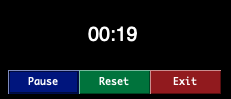
#!/usr/bin/env python

import PySimpleGUI as sg
import time

"""
 Timer Desktop Widget Creates a floating timer that is always on top of other windows You move it by grabbing anywhere on the window Good example of how to do a non-blocking, polling program using PySimpleGUI
 Something like this can be used to poll hardware when running on a Pi

 While the timer ticks are being generated by PySimpleGUI's "timeout" mechanism, the actual value
  of the timer that is displayed comes from the system timer, time.time().  This guarantees an
  accurate time value is displayed regardless of the accuracy of the PySimpleGUI timer tick. If
  this design were not used, then the time value displayed would slowly drift by the amount of time
  it takes to execute the PySimpleGUI read and update calls (not good!)

    Copyright 2021 PySimpleGUI
"""


def time_as_int():
    return int(round(time.time() * 100))


# ----------------  Create Form  ----------------
sg.theme('Black')

layout = [[sg.Text('')],
          [sg.Text('', size=(8, 2), font=('Helvetica', 20),
                justification='center', key='text')],
          [sg.Button('Pause', key='-RUN-PAUSE-', button_color=('white', '#001480')),
           sg.Button('Reset', button_color=('white', '#007339'), key='-RESET-'),
           sg.Exit(button_color=('white', 'firebrick4'), key='Exit')]]

window = sg.Window('Running Timer', layout,
                   no_titlebar=True,
                   auto_size_buttons=False,
                   keep_on_top=True,
                   grab_anywhere=True,
                   element_padding=(0, 0),
                   finalize=True,
                   element_justification='c',
                   right_click_menu=sg.MENU_RIGHT_CLICK_EDITME_EXIT)

current_time, paused_time, paused = 0, 0, False
start_time = time_as_int()

while True:
    # --------- Read and update window --------
    if not paused:
        event, values = window.read(timeout=10)
        current_time = time_as_int() - start_time
    else:
        event, values = window.read()
    # --------- Do Button Operations --------
    if event in (sg.WIN_CLOSED, 'Exit'):        # ALWAYS give a way out of program
        break
    if event == '-RESET-':
        paused_time = start_time = time_as_int()
        current_time = 0
    elif event == '-RUN-PAUSE-':
        paused = not paused
        if paused:
            paused_time = time_as_int()
        else:
            start_time = start_time + time_as_int() - paused_time
        # Change button's text
        window['-RUN-PAUSE-'].update('Run' if paused else 'Pause')
    elif event == 'Edit Me':
        sg.execute_editor(__file__)
    # --------- Display timer in window --------
    window['text'].update('{:02d}:{:02d}.{:02d}'.format((current_time // 100) // 60,
                                                        (current_time // 100) % 60,
                                                        current_time % 100))
window.close()