import ipywidgets as widgetsw = widgets.IntSlider()
display(w)
w.value
# > 32
# 以下でウィジェットは消える
W.close()
目次
ToggleButton
isClick = widgets.ToggleButton(
    value=False,
    description='Click me',
    disabled=False,
    button_style='', # 'success', 'info', 'warning', 'danger' or ''
    tooltip='Description',
    icon='check' # (FontAwesome names without the `fa-` prefix)
)
display(isClick)

isClick.value
# > True or False

CheckBox
isChecked = widgets.Checkbox(
    value=False,
    description='Check me',
    disabled=False,
    indent=False
)
display(isChecked)

isChecked.value
# > True or False
Dropdown
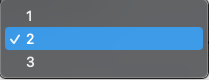
select_1 = widgets.Dropdown(
    options=['1', '2', '3'],
    value='2',
    description='Number:',
    disabled=False,
)
display(select_1)

select_1.value
# > '2'
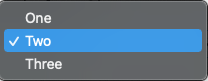
select_2 = widgets.Dropdown(
    options=[('One', 1), ('Two', 2), ('Three', 3)],
    value=2,
    description='Number:',
)
display(select_2)

select_2.value
# > '2'
RadioButtons
select_3 = widgets.RadioButtons(
    options=['pepperoni', 'pineapple', 'anchovies'],
#    value='pineapple', # Defaults to 'pineapple'
#    layout={'width': 'max-content'}, # If the items' names are long
    description='Pizza topping:',
    disabled=False
)
display(select_3)

select_3.value
# > 'peperoni'
With dynamic layout and very long labels
- 説明文を長くする場合、
widets.Boxを利用する widgets.Label(value=''),widgets名
select_4 = widgets.Box(
    [
        widgets.Label(value='Pizza topping with a very long label:'),
        widgets.RadioButtons(
            options=[
                'pepperoni',
                'pineapple',
                'anchovies',
                'and the long name that will fit fine and the long name that will fit fine and the long name that will fit fine '
            ],
            layout={'width': 'max-content'}
        )
    ]
)

display(select_4)
select
select_5 = widgets.Select(
    options=['Linux', 'Windows', 'macOS'],
    value='macOS',
    # rows=10,
    description='OS:',
    disabled=False
)
display(select_5)

select_5.value
# > 'macOS'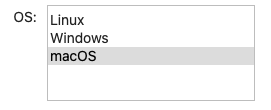
ToggleButtons
select_6 = widgets.ToggleButtons(
    options=['Slow', 'Regular', 'Fast'],
    description='Speed:',
    disabled=False,
    button_style='', # 'success', 'info', 'warning', 'danger' or ''
    tooltips=['Description of slow', 'Description of regular', 'Description of fast'],
#     icons=['check'] * 3
)
display(select_6)

select_6.value
# > 'Regular'
String widgets
str_1 = widgets.Text(
    value='Hello World',
    placeholder='Type something',
    description='String:',
    disabled=True
)

display(str_1)

# 以下文字が入らないが。。。

str_1.value
# > 'テストです'
Button
- fontawesomeページのアイコンを利用できる
button = widgets.Button(
    description='Click me',
    disabled=False,
    button_style='', # 'success', 'info', 'warning', 'danger' or ''
    tooltip='Click me',
    icon='check' # (FontAwesome names without the `fa-` prefix)
)
button

# 戻り値?がわからない
# あとで学習する
https://blog.amedama.jp/entry/ipywidgets-jupyter-ui
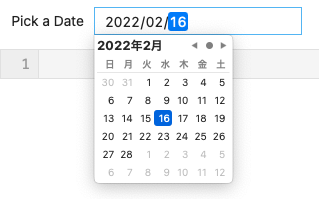
Date picker
dt = widgets.DatePicker(
    description='Pick a Date',
    disabled=False
)

display(dt)

dt.value
# > datetime.date(2022, 2, 16)